
Screenshots
App details
- Updated
- Jan 8, 2010
- Language
- English
- Developer
- Zamaan's Software
- Category
- Mobile
SoftPas in:
This product is also available in the following languages:
About Pepsi Volume Controller
Download Pepsi Volume Controller – Volume Control, Pepsi, System Tray, Desktop Tool, Fun Design, Easy Volume Adjustment, Simple Utility
Overview
The Pepsi Volume Controller is a lightweight desktop utility designed to simplify system volume management with a playful twist. Developed by Joe C. Jones and released on January 8, 2010, the app offers a unique blend of functionality and visual personality by mimicking the iconic Pepsi can in its interface. While not intended for advanced audio engineering, it serves as a convenient tool for users who frequently adjust their system volume and appreciate a touch of brand-inspired flair. The application is particularly suited for fans of Pepsi who enjoy personalized desktop experiences, as well as individuals seeking a minimalistic approach to volume control without the clutter of complex settings.
It addresses the common need for quick access to audio adjustments during media playback, video conferencing, or gaming sessions. By placing a clickable volume control icon in the system tray, the app reduces the time required to locate and adjust sound levels through default OS menus. Its presence ensures that volume changes are immediate and intuitive. The app fits into the broader ecosystem of utility tools that enhance user productivity and comfort, especially on Windows systems where such lightweight enhancements are valued by power users and casual users alike. Although the developer did not provide additional technical details, the app’s enduring presence since 2010 suggests a stable and reliable core function.
Key Features & Functionality
- Easy Volume Control: Users can adjust system volume with a single click on the Pepsi can-shaped icon in the system tray. This direct interaction eliminates the need to navigate through multiple menus or settings panels, making it ideal for fast, on-the-go adjustments.
- Always On Top: The controller remains visible above all other windows, ensuring instant accessibility regardless of the current application. This feature is especially useful during multitasking or when working with full-screen programs.
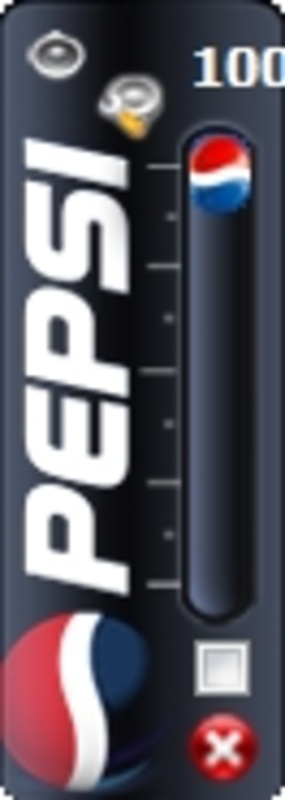
- Fun Design: Styled after a classic Pepsi can, the interface adds a whimsical element to the desktop environment. For users who value aesthetic customization, this design choice enhances the overall user experience by aligning with personal brand preferences.
- Simplicity at Its Best: The app focuses exclusively on volume adjustment, avoiding feature bloat. This minimalist approach ensures a low learning curve and consistent performance without unnecessary background processes.
- Quick Access: With the controller always available in the system tray, users can modify audio levels without interrupting their workflow—ideal for scenarios such as sudden volume changes during video calls or media playback.
For example, during a remote meeting, a user can quickly mute or lower the volume without switching applications. Similarly, when watching a movie, the icon allows for immediate sound level corrections without leaving the full-screen view. These real-world use cases highlight how the app enhances daily computing efficiency through thoughtful design and intuitive interaction.
Interface, UX & Performance
The interface of Pepsi Volume Controller is centered around its distinctive Pepsi can design, which serves both aesthetic and functional purposes. The visual layout is clean and uncluttered, with the icon positioned in the system tray for consistent visibility. Navigation is minimal—users interact solely through the icon, which expands into a volume slider upon click. This streamlined approach supports a frictionless user experience, especially for those who prioritize speed and simplicity.
The app’s responsiveness is evident in its near-instantaneous reaction to user input. Volume adjustments are applied immediately, with no noticeable lag. Although the developer did not list formal performance metrics, the app’s small file size of 1.2 MB suggests low resource consumption. It is likely to perform efficiently across a range of Windows devices, including older or lower-end systems. Stability appears to be well-maintained, given its long-standing presence since 2010. However, compatibility with newer Windows versions has not been explicitly confirmed. The app’s lightweight nature ensures it does not interfere with other running applications or system performance.
Platform Compatibility & Technical Requirements
Pepsi Volume Controller is designed for the Windows platform and requires no additional software to operate. The current version is 1.0, with a file size of 1.2 MB. The developer did not specify minimum OS requirements, nor did they list compatibility details for specific Windows versions beyond the general platform. As such, users should exercise caution when installing on newer systems, particularly those running Windows 11 or later, if no official updates have been released.
Given its release date in 2010, the app may rely on older system APIs or frameworks that are no longer standard in modern Windows environments. While it may function on current systems through compatibility modes, this is not guaranteed. The lack of updated technical specifications means users should proceed with awareness of potential installation or runtime issues. The app is available as a free download, making it accessible to a broad audience despite its age.
Pros and Cons
Pros
- Unique Pepsi-themed design enhances desktop personalization
- Simple, intuitive interface with minimal learning curve
- Quick access to volume controls via system tray
- Always-on-top feature ensures consistent visibility
- Lightweight and consumes minimal system resources
- Free to download and use
Cons
- No official compatibility details for modern Windows versions
- Limited to basic volume control with no advanced audio features
- App has not been updated since 2010; may lack support for newer OS features
- Developer did not provide technical documentation or support channels
- File size and version details suggest outdated development practices
FAQ
Is Pepsi Volume Controller safe to download and install?
Yes, the app is free and available from trusted sources. However, as it has not been updated since 2010, users should scan the file with antivirus software before installation.
Can I use Pepsi Volume Controller on Windows 11?
While the app may function on Windows 11, compatibility is not officially confirmed. Users are advised to test it in a safe environment or use compatibility mode if needed.
Does Pepsi Volume Controller require an internet connection?
No, the app operates offline and does not require internet access to function.
Is there a mobile version of Pepsi Volume Controller?
Currently, the app is only available for Windows. There is no mobile version for Android or iOS.
How do I uninstall Pepsi Volume Controller?
Users can remove the app through the Windows Control Panel under "Programs and Features" or via the Settings app under "Apps."
Final Thoughts + CTA
Pepsi Volume Controller stands out not for its technical complexity, but for its charm and purposeful simplicity. It’s a niche tool that appeals to fans of Pepsi and users who value a clean, distraction-free way to manage system volume. While its age and lack of updates may raise concerns about compatibility, its lightweight design and intuitive interface remain effective for basic audio control. For those seeking a fun, no-frills utility that brings a smile to their desktop, it remains a surprisingly viable option. The app proves that sometimes, the most valuable tools are the ones that do one thing well—and do it with personality.
Download Pepsi Volume Controller now
Guides & Tutorials
How to install Pepsi Volume Controller
- Click the Download button above.
- Once redirected, accept the terms and click Install.
- Wait for the Pepsi Volume Controller download to finish on your device.
How to use Pepsi Volume Controller
This software is primarily used for its core features described above. Open the app after installation to explore its capabilities.
User Reviews
No reviews yet. Be the first to share your experience.
You may also like
more
Que no te pillen¡
About !Que no te pillen¡Reviewed by Jason A. BilbreyShow MoreShow Less

3D Combat Zone
About 3D Combat ZoneOriginally released in 1983, 3D Combat Zone immerses players...

666: El día del portal
About 666: El día del portalOn June 6, 2006, Agent P. Stone uncovers a sinister...

80 in 1 Best Flash games
About 80 in 1 Best Flash games 80 in 1 Best Flash games is a collection of 80 fl...

ABYSS SEEKERーーWhat Do You See Deep in The Abyss
About ABYSS SEEKERーーWhat Do You See Deep in The AbyssIn ABYSS SEEKER, players...

ACA NEOGEO THE KING OF FIGHTERS 2002 for Windows
About ACA NEOGEO THE KING OF FIGHTERS 2002 for WindowsTHE KING OF FIGHTERS 2002,...